Role
Lead Product Designer & Sole Front-End Engineer
Company
Just Capital
Timeline
2025–2026
Tools
TypeScript, JavaScript, D3, PHP, HTML, CSS Custom Properties, Figma, Design Tokens
The Challenge
Focusing on the V2 evolution, the new CSS architecture, and integrating V1 feedback.
Following a successful initial launch, Phase 2 required maturing the platform from an early-stage product into a scalable enterprise system. The functional challenge involved integrating critical user feedback from the V1 launch, adding new workflows like a “disclose now” feature, and refining micro-interactions across the UI. The technical challenge was rooted in technical debt. Phase 1 was built without a semantic design system because the framework boundaries were still being defined during early research and development. The V2 mandate required entirely refactoring the front-end CSS architecture into a strict semantic token structure to ensure future scalability and support a massive upcoming visual overhaul.
The Thinking
The core strategic hurdle was the rebrand. The new corporate branding was designed exclusively for the parent company’s marketing presence, not for a dense, data-heavy intelligence platform. I led the effort to extrapolate and upgrade these brand guidelines, creating a specialized visual language that supported complex data visualization without losing the core brand identity. Because the underlying information architecture was already validated in Phase 1, my focus was on UX strategy with the front-end execution and CSS migration. I updated the entire front-end to utilize the new semantic token structure and refined the UX for the conversational AI search interface, establishing a highly polished design foundation prepared for future live deployment. Serving executives alongside analysts meant the dense research views needed a faster read — surfacing the headline answer first, with full data a drill-down away.
What I Was Responsible For
I owned the full front-end refactor from V1’s rigid styling to a scalable, semantic CSS token structure — the architectural foundation the upcoming rebrand required. From there, I extrapolated the parent company’s marketing brand into a specialized visual language built for dense data interfaces, then carried that system through to production: implementing disclosure workflows surfaced by user feedback, refining micro-interactions across the UI, and redesigning the conversational UX for the AI search interface ahead of its live release.
The Execution
System Architecture & Tokens
- Refactored the rigid V1 front-end into a strict semantic CSS token system, establishing the technical foundation required for scalable, enterprise-level theming.
Brand Extrapolation
- Translated the parent company’s high-level marketing guidelines into an accessible, high-density visual language optimized for complex data visualization and D3 components.
Closing Product Gaps
- Upgraded the AI search interface and engineered new, highly-requested features. This directly addressed the biggest friction points reported by users after the initial launch, keeping them inside the platform instead of forcing them to work externally.
Key Tradeoffs
v1 → v2

AI Ask Me Anything — prompt cards scaffold common queries. 4-min manual workflows → 30-second lookups. Every response cites its source data.
Before

After

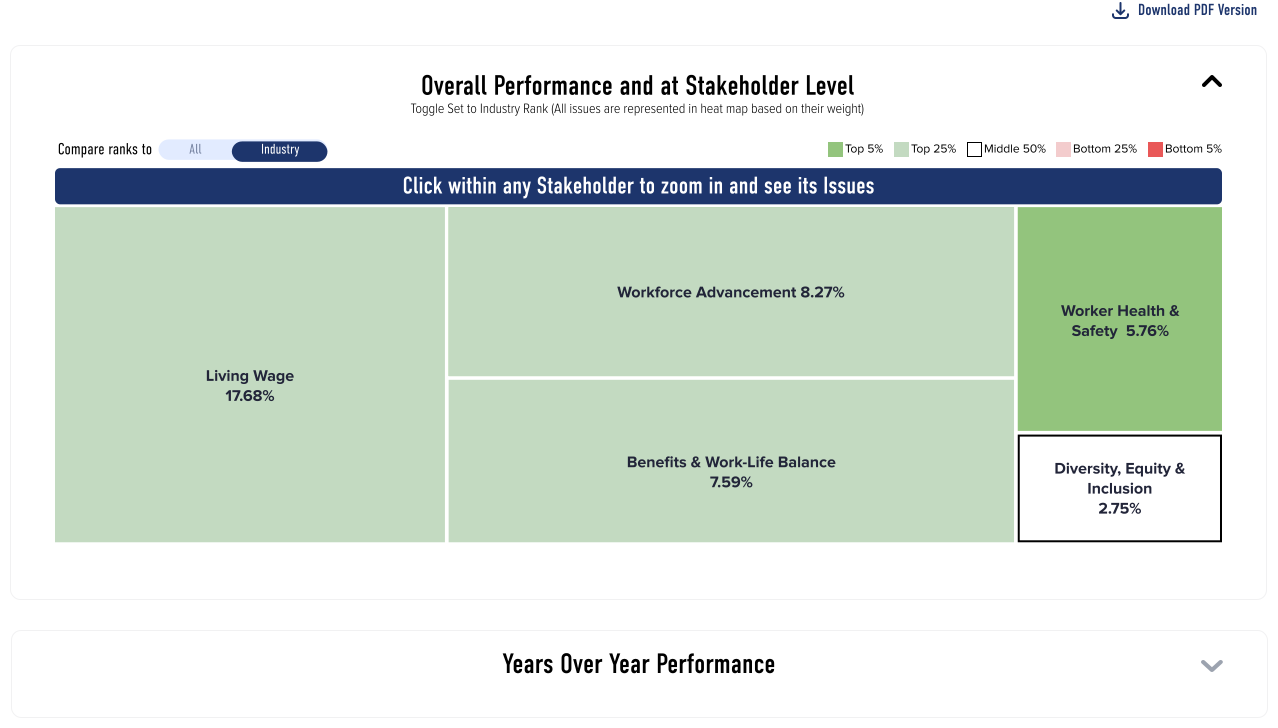
v1: raw ranks in a flat table. v2: quintile-coded pillar cards, expandable bar charts benchmarked against industry average and top performer, live index return. Scan-and-export → at-a-glance diagnostic.
Before
After

Engineered a dynamic hierarchy locator. This solves navigation friction by keeping general users oriented across all 5 drill-down levels.
Before
After

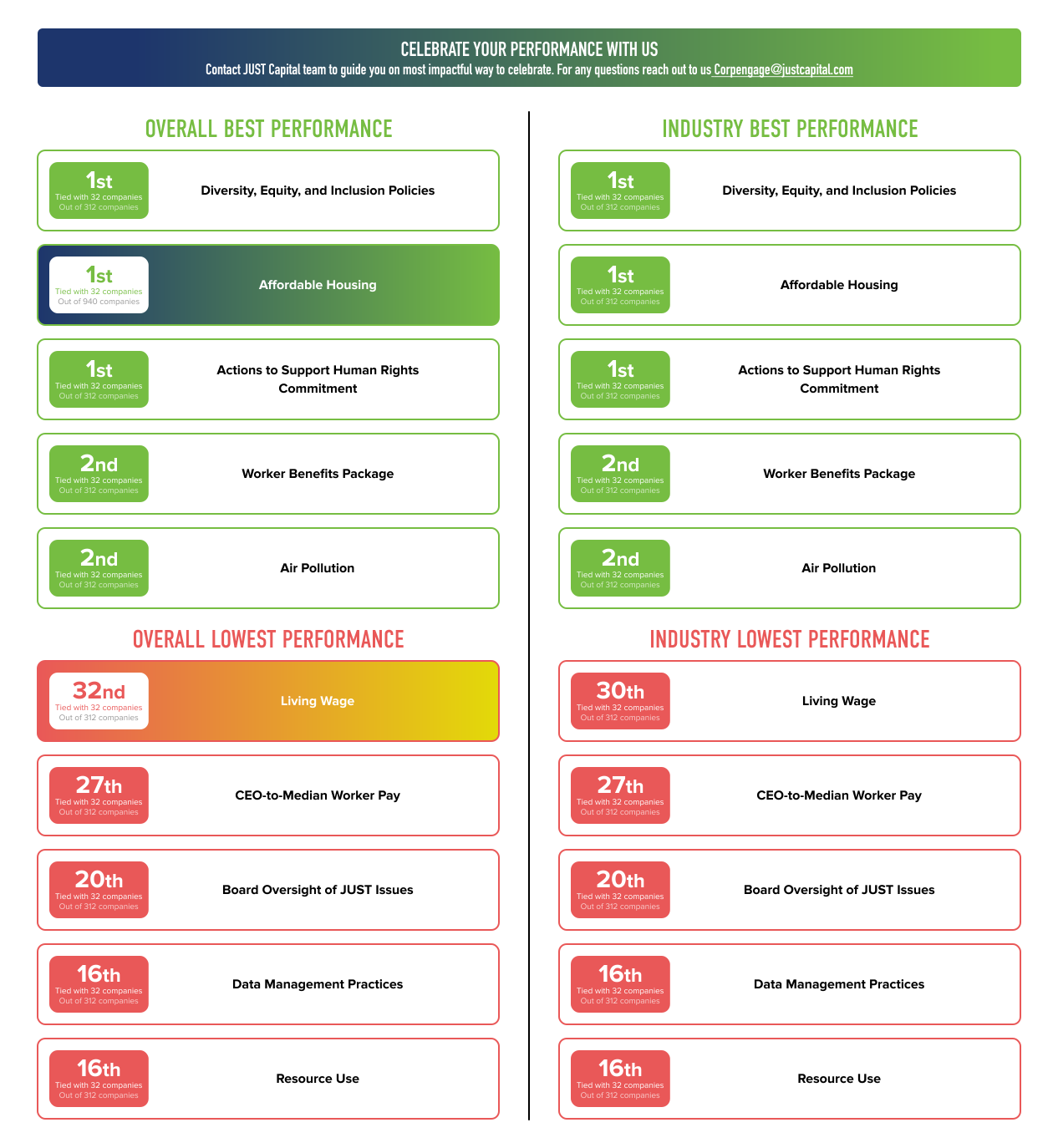
V1: Required navigating away to a hidden page just to view performance summaries. V2: Eliminated this friction. Users now see a brief, immediate summary of their top and worst 5 metrics alongside total industry size without a single click.
Before
After

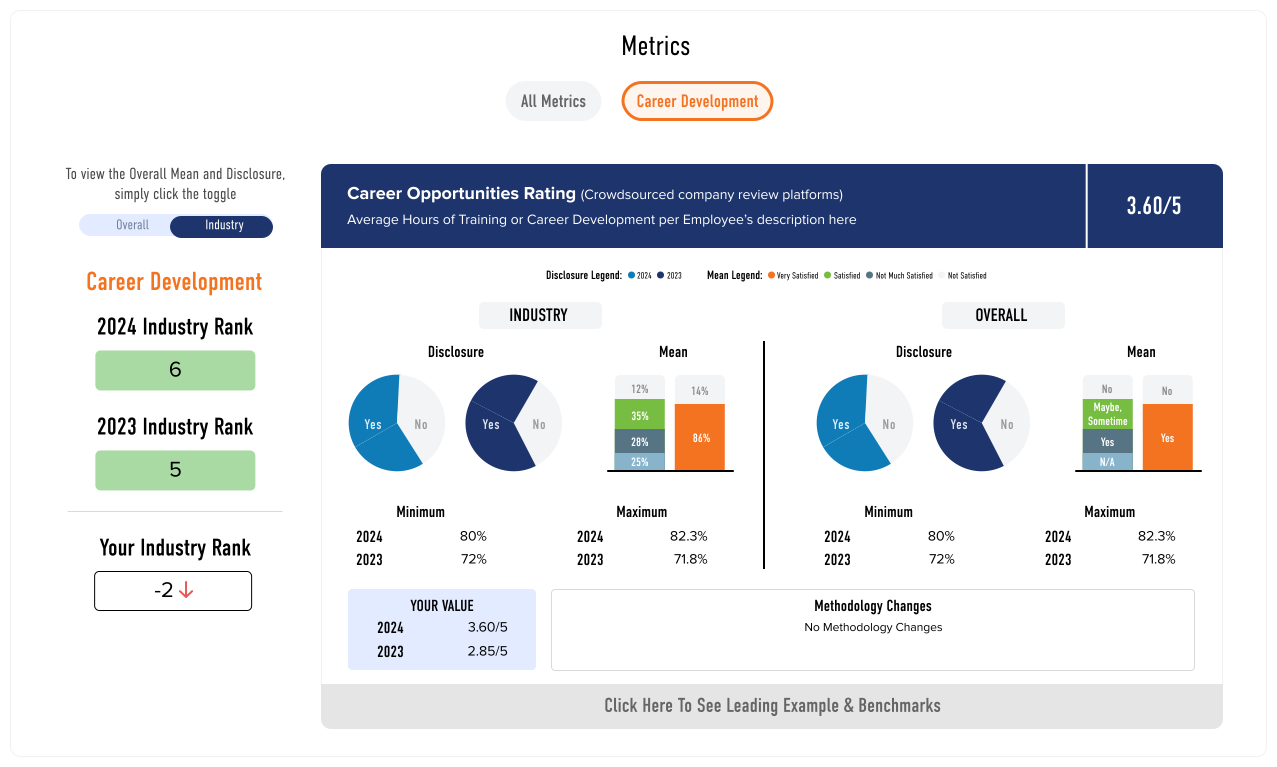
V1: A dense research view containing legacy tables and charts but lacking actionable next steps. V2: Applied a complete visual overhaul to the existing charts and tables to improve legibility. The core challenge was integrating new workflows like the “Peer Comparison” and “Disclose Now” buttons into this highly constrained space. I engineered a harmonious layout that balances the dense data with these new primary actions without causing visual clutter.
Before

After

V1: Legacy peer benchmarking relying on constrained views and tooltips. V2: Upgraded to a highly legible, structured format. The critical UX enhancement is the new direct path to Scenario Analysis. Users can now compare against peers and immediately run predictive models in a single, continuous research flow.
Before

After

Workflow Unification: V1: Scenario creation and results were fragmented across multiple separate pages, creating a disjointed user loop. V2: Unified the modeling workflow into a single dynamic workspace. By anchoring the layout with distinct “Create” and “Find” cards, I consolidated multiple legacy views into interchangeable modules on a single screen. During scenario creation, company data is intentionally restricted to just core rankings to eliminate visual noise and keep the user entirely focused on their inputs.
The System in Code
The token architecture that powered the V2 migration. A single semantic layer that connected brand identity, data visualization, and accessibility compliance — so every component spoke the same language from day one.
CSS Custom Properties Architecture
The three-layer token system: global definitions, component application, and accessibility compliance — all governed by a single source of truth.
Phase 2 was a masterclass in full-stack design. It validated that the most effective way to ship enterprise-grade UI is to own the pipeline from the initial wireframes straight through to the front-end CSS. Speaking the language of both user experience and technical architecture allowed me to seamlessly integrate complex workflows while maintaining absolute control over the final visual fidelity.
Bridging the Gap Between Canvas and Code
If you're transforming a product that people already depend on — I've architected that transition without breaking the trust that took years to build.
All Projects